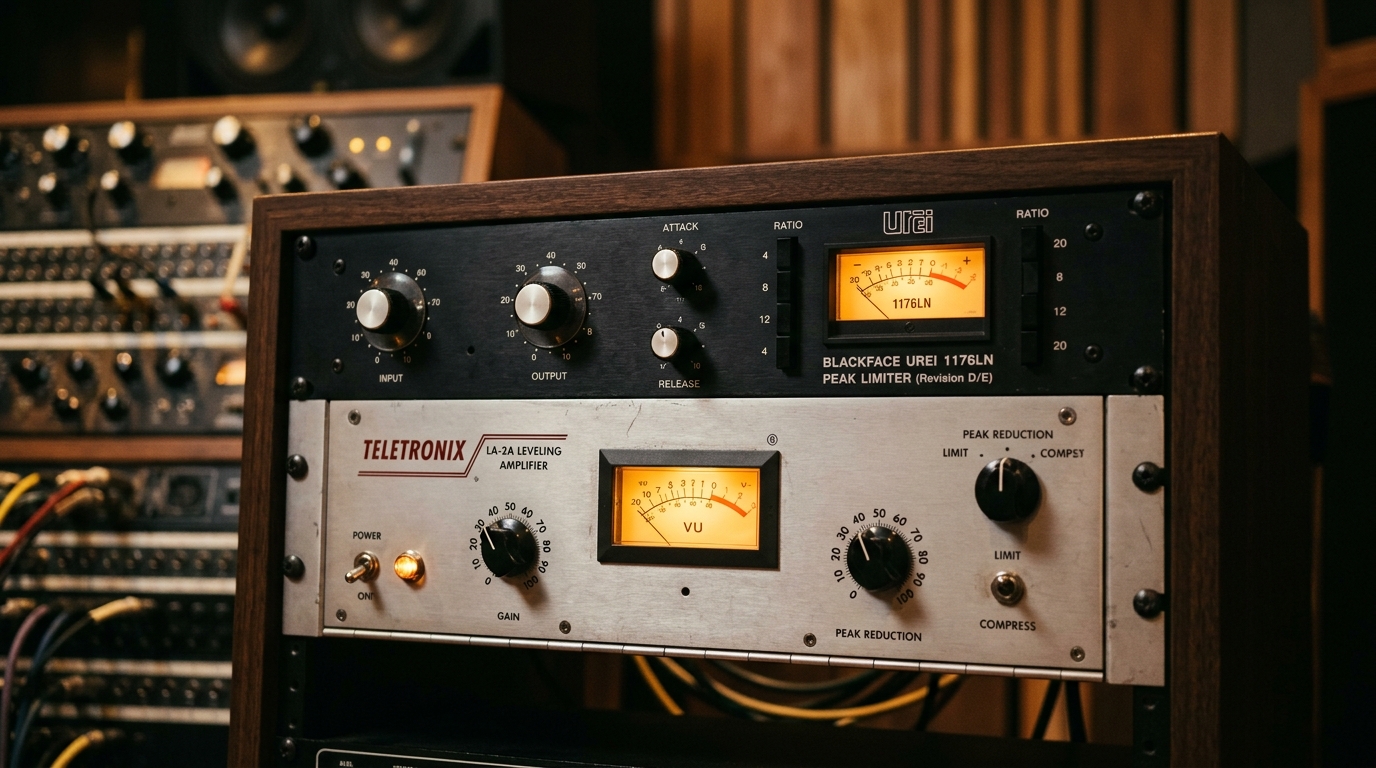
If you look at the channel strip presets or hardware racks of world-class vocal mixing engineers—from Dave Pensado to Serban Ghenea to MixedByAli—you will see one specific hardware combination over and over again:
An UREI / Universal Audio 1176 peak limiter paired directly with a Teletronix LA-2A optical leveling amplifier.
This two-stage dynamic processing setup, known in the audio engineering world as serial compression, has been the backbone of modern pop, rap, rock, and R&B lead vocals for over fifty years.
Yet when beginner producers try chaining these two compressors together in their DAW, the vocal often turns into an over-compressed, squashed, noisy mess. Cymbals bleed into the vocal mic, breath noises sound like jet engines, and the singer loses all emotional dynamics.
Reddit forums and Quora threads are filled with endless confusion: “Which compressor goes first: the 1176 or the LA-2A? What ratio should I use? How much gain reduction is too much on a lead vocal?”
The secret to this legendary chain lies in understanding the physical circuit topologies of both units: an ultra-fast FET (Field Effect Transistor) circuit working in tandem with a slow, forgiving optical photocell circuit.
When calibrated correctly, this chain gives you vocals that feel pinned two inches from the listener's face, completely controlled in volume, while still sounding remarkably organic, dynamic, and open.
Here is the definitive guide to dialing in the 1176 + LA-2A serial compression chain for commercial, radio-ready vocals.
1. The Core Philosophy: Division of Labor in Serial Compression
Before turning a single knob, you must understand the single biggest mistake amateur engineers make: asking one compressor to do everything.
If you use a single compressor and force it to control a dynamic vocal that fluctuates by 18dB between a whispered verse and a screaming chorus, that compressor has to work overtime:
* You force the single unit to clamp down with 10dB to 12dB of gain reduction.
* The compressor audibly pumps, sucking the life out of the performance.
* Distortion creeps in, high-frequency transients get crushed, and ambient room noise rises unpleasantly during quiet pauses.
Serial compression solves this problem through the division of labor.
Instead of asking one compressor to handle 10dB of gain reduction, you use two completely different compressors, each handling a specialized task with only 2dB to 4dB of subtle gain reduction.
The Division of Labor Chain:

Raw Vocal Track (Wide 18dB Dynamic Range)
      │
      ▼
[Stage 1: 1176 FET Compressor]  ====> Catches Fast Transients / Peaks Only (3dB - 4dB GR)
      │
      ▼ (Pre-Leveled Audio Signal)
[Stage 2: LA-2A Optical Leveler] ====> Smooths Overall Average Musical Volume (2dB - 3dB GR)
      │
      ▼
Polished Radio Vocal (Locked, Consistent, Zero Audible Pumping)
The 1176 acts like a sniper rifle, catching runaway transient peaks that happen in milliseconds. The LA-2A acts like a warm blanket, gently smoothing the overall body of the vocal.
2. Stage 1: The 1176 Peak Tamer (Attack, Release, and Ratios)
The 1176 is an ultra-fast FET compressor. Its attack time can be dialed down to an astonishing 20 microseconds (that is 20 millionths of a second). It is so fast that it can catch the initial consonant transient of a word before the human brain even registers that a sound was made.
In the classic serial chain, the 1176 goes first.
The Counter-Intuitive 1176 Knobs:
If you are new to the 1176, beware of the vintage knob numbering:
* Attack & Release: On an 1176, 7 is the fastest setting, and 1 is the slowest setting. Turning the knob clockwise makes it faster, which is the exact opposite of modern digital compressors!
The Battle-Tested 1176 Vocal Settings:
- Ratio: Set to 4:1. A 4:1 ratio provides gentle, musical peak compression. (Reserve 8:1 or the famous "All Buttons In / British Mode" for parallel distortion tracks).
- Attack: Set between 3 and 5 (medium-fast, around 400 to 600 microseconds). You do not want the fastest setting (7), because an instantaneous 20-microsecond attack will completely flatten the natural punch of consonants like "P" and "T", making the singer sound like they have a speech lisp.
- Release: Set to 7 (the fastest release time, around 50 milliseconds). You want the 1176 to grab the sudden transient spike and immediately let go before the sustained vowel sound begins.
- Input Gain: Adjust the Input knob until the VU meter needle twitches only on the loudest vocal peaks (plosives, belt notes, loud syllables), pulling down 3dB to 5dB of gain reduction.
On quiet verses, the 1176 needle should barely move. It is there strictly as a dynamic security guard.
3. Stage 2: The Teletronix LA-2A (Optical Smoothing and Warmth)
Once the 1176 has tamed the wild peaks, the audio signal enters the Teletronix LA-2A.
The LA-2A is an optical leveling amplifier that uses an electro-luminescent light panel and a photo-resistor cell (the famous T4 optical attenuator). When audio enters the unit, the light panel glows brighter as volume increases, and the photocell reacts by lowering the gain.
Because of this physical light-to-resistance circuit, the LA-2A has a natural, program-dependent two-stage release:
* It releases the first 50% of the compression quickly (within 60 milliseconds).
* It releases the remaining 50% very slowly over several seconds.
This release curve matches the biological hearing characteristics of the human ear with breathtaking musicality.
Dialing in the LA-2A:
The LA-2A is refreshingly simple with only two primary controls: Peak Reduction and Gain.
- Set the mode switch to Compress (not Limit).
- Turn the Peak Reduction knob clockwise until the needle gently bounces between 1dB and 3dB of gain reduction on average throughout the performance.
- Adjust the Gain knob to level-match the output so the bypassed signal matches the compressed signal in perceived volume.
Because the 1176 already clipped off the spiky transients in Stage 1, the LA-2A never gets startled by sudden loud syllables. It provides continuous, creamy vocal body and saturation that glues the vocal securely into the mix.
Engineer Tip: If you notice your LA-2A is compressing too heavily on low vocal mud (chest resonance below 150Hz), look for an R37 HF Emphasis screw or sidechain filter on your plugin. Turning this screw adjusts the compressor’s sidechain to ignore the low-end frequencies and react purely to vocal presence.
4. The Debate: Should the LA-2A Ever Go First?
While the 1176 -> LA-2A order is the standard modern radio protocol, some legendary engineers (especially on vintage Motown or acoustic soul sessions) reverse the order: LA-2A -> 1176.
When to Put LA-2A First:
If you are mixing an acoustic ballad, jazz record, or dynamic singer-songwriter performance where you want maximum natural warmth and zero aggressive edge:
* Putting the slow optical LA-2A first gently massages the performance.
* Placing a gentle 1176 afterward catches any stray transients that slipped past the optical cell.
When to Put 1176 First (Modern Standard):
For modern Hip-Hop, Trap, Pop, Metal, and Electronic R&B, the 1176 must go first. Modern tracks require immediate, aggressive transient control. If an aggressive rap vocal hits an LA-2A first, the slow optical release will cause the compressor to choke and stay clamped down through the entire verse.
Summary of Order of Operations:

Modern Commercial (Trap, Rap, Pop, Modern Rock):
[1176 Fast Peak Limiting] =====> [LA-2A Smooth Optical Leveling]
Result: In-your-face, modern, bright, punchy, hyper-consistent.

Vintage / Acoustic (Jazz, Folk, Warm Ballads):
[LA-2A Optical Leveling]   =====> [1176 Fast Peak Limiting]
Result: Warm, blooming, natural, subtle dynamic breathing.
5. Gain Staging and De-Essing Around the Chain
Compression brings up low-level details. That means it also brings up sibilance ("S", "Sh", "Ch" sounds) and room noise.
If you don't position your corrective tools correctly around the 1176 + LA-2A chain, you will amplify harsh frequencies into unlistenable distortion.
The Correct Vocal Processing Chain Order:
- Corrective EQ (Subtractive): Cut unwanted 30Hz room rumble and notch out nasty resonant room spikes before compression. You don't want your compressors reacting to unwanted noise.
- De-Esser (Stage 1): Tame harsh sibilance before it hits the 1176. If you compress a harsh "S" sound with an 1176, the compressor will distort the sibilance.
- 1176 FET Compressor: Tame peaks (3dB to 4dB gain reduction).
- LA-2A Optical Compressor: Smooth overall vocal body (2dB to 3dB gain reduction).
- Tonal / Color EQ (Additive): Boost broad musical air (e.g. 10kHz–12kHz Pultec high shelf) now that the dynamics are completely controlled.
- De-Esser (Stage 2 - Post EQ): A secondary gentle de-esser to catch any high-end harshness introduced by your additive EQ boost.
Frequently Asked Questions (Community Q&A)
Can I use stock DAW compressors to get the same 1176 + LA-2A sound?
Yes. Modern stock compressors (like Logic Pro's Compressor, Ableton's Compressor, or FL Studio's Fruity Limiter) include switchable circuit topologies:
* In Logic Pro, set the first compressor to Studio FET (which models the 1176) with fast attack and fastest release. Set the second compressor to Vintage Opto (which models the LA-2A) with smooth optical response.
* While analog-modeled third-party plugins (like Universal Audio, Slate Digital, or Waves CLA series) add authentic harmonic tube/transistor distortion, you can achieve 90% of the same dynamic control using stock plugins paired with a subtle tape or tube saturation plugin.
How much total gain reduction should I see across both compressors?
For modern commercial music (pop, trap, rap), aim for 3dB to 5dB of peak reduction on the 1176, followed by 2dB to 3dB of smooth leveling on the LA-2A. That equals roughly 6dB to 8dB of total transparent gain reduction. If you push beyond 10dB total reduction on the track inserts, switch to parallel compression to avoid choking the life out of the singer's performance.
Why do my vocal breaths sound so loud after compression?
Because compressors reduce loud signals and apply makeup gain to the entire track, quiet sounds (like mouth clicks, room reflections, and gasping breaths) are amplified significantly. The fix is simple: use manual clip gain automation or a dedicated vocal gate / de-breath plugin (like iZotope RX Breath Control) before the audio enters your compression chain.
References & Authoritative Reading
Deepen your technical grasp of analog compressor circuits and serial dynamics processing with these legendary audio engineering resources:
- Universal Audio Blog: Compressor Basics: The Legendary 1176 and LA-2A Story — The definitive technical design history of FET and optical attenuator circuits.
- Sound On Sound: Classic Compressor Topologies: VCA, FET, Optical, and Vari-Mu — In-depth component-level guide to attack times and knee behavior.
- Abbey Road Studios Education: Serial Dynamics and Vocal Leveling — Studio case studies on stacking vintage analog hardware limiters.
- Waves Audio Guides: How to Chain Compressors on Lead Vocals — Practical DAW routing, gain staging targets, and attack/release calibration.
Want That Upfront, Commercial Vocal Sound on Your Music?
If you are struggling to make your vocals sound polished, dense, and radio-ready without distortion:
👉 Explore My Audio Samples to hear before/after vocal mixes across Hip-Hop, Pop, and R&B.
👉 Book a Mixing & Mastering Session and let’s craft a competitive, industry-standard sound for your next release.

Want This Level of Clarity on Your Next Release?
Don't let a flat mix bury your songwriting. Let's dial in the punch, vocal warmth, and radio-ready loudness your track deserves.